Field guide · Work & business workflows
Office and business workflows: split a job into steps AI can take
You ask AI to “handle the invoices” and get a smooth paragraph with unchecked amounts, tax IDs and company names. Office work is not a faster chat box; it is a checkable pipeline: where input comes from, who does which step, what a human must see and where failures go back. Split the job, and AI has a place.
- Write the input, output, definition of done and return conditions first.
- Let AI draft and move data; a human checks critical numbers and names.
- Run one week of real work before rolling it out to a department.
The full guide starts below. Use the tables for reference; you do not need to memorise them.
Take one concrete job: 50 invoices a day. AI only extracts amount, tax ID and company name into a sheet; finance checks 10. Run that for a week.
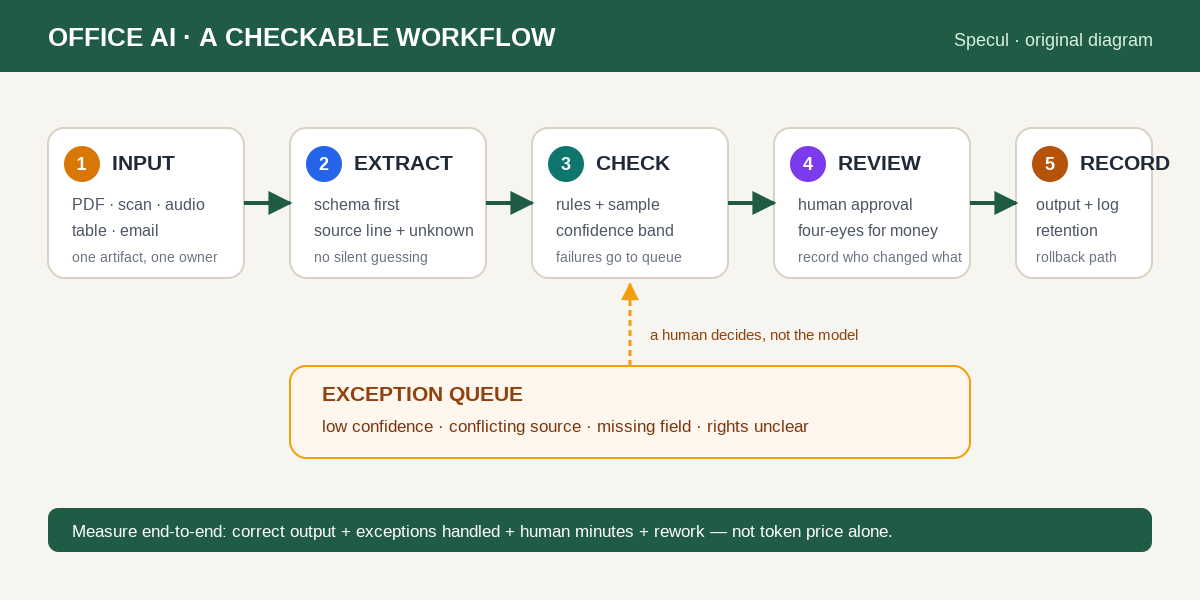
1 · Draw the pipeline before choosing a tool
A one-page pipeline card states five things: what the input is (document, audio, table), where the output lands (system and fields), who owns the result, what counts as acceptance, and which queue receives failures or low-confidence cases. Without these five, any model only hides uncertainty deeper.
Separate assistance from automation: assistance proposes and a human decides; automation writes or sends directly. Assistance can launch earlier; automation needs permissions, audit and rollback. Do not use one pilot to prove both.
Mark where a human waits for the model and where the model waits for a human. The first is review; the second is missing input. Their cost and metrics are different.
| Stage | Must be explicit | Common failure |
|---|---|---|
| Input | File type, source, permission, personal data | Skewed scan, missing page, unclear rights |
| Extract | Fields, types, required/optional, how unknown is represented | The model invents a missing field |
| Check | Rules, sampling rate, confidence threshold | Only totals checked, not per-row sources |
| Review | Who may edit, what needs four eyes | Reviewer rubber-stamps |
| Record | Output, log, retention, rollback point | Cannot answer who changed this row |
2 · Four high-frequency tasks; start with one
Document extraction: scan/PDF → table fields. The key is not OCR accuracy but field definitions, page and coordinates, unknown values and a review queue. The same invoice moves fields across supplier templates; a generic model concentrates errors on a minority of templates.
Meeting notes: audio → minutes and actions. Separate verbatim speech, summary, decision and action. Keep speaker, timestamp and the original sentence so claims can be checked. A smooth summary does not replace confirmation of key decisions.
Table merge/reconciliation: several tables → one master table plus an exception list. Define the key, duplicate rules and conflict priority first. Do not let a model merge “because it looks similar”. For amounts, dates and IDs, a rule engine is usually more reliable than a model.
Document review: long text → issue table. Every issue needs a source location, suggested change and severity. An issue without a location cannot be checked. Contracts, compliance and HR documents need a qualified final reviewer.
3 · Structured output: give “unknown” a place to live
An output schema fixes three things: field names and types, required vs optional, and how unknown, conflicting or not-applicable values are represented. A binary yes/no forces “not found” into a guess; allowing null with a reason keeps the error visible.
Each result should carry provenance where possible: page, cell, timestamp or source snippet. Provenance is not decoration; it is the entry point for review, correction and audit. A field without provenance should be treated as a candidate, not a fact.
Confidence is a routing signal, not an accuracy guarantee. A model saying “0.95” does not mean 95% correct. Measure the real error rate of high- and low-confidence groups on a fixed sample, then set the threshold.
4 · The human role: review is not clicking “approve”
A review screen should show source, extracted result, provenance, rule warnings and edit history in one view. A result plus an approve button degrades review into a rubber stamp.
Tier by risk: low-risk fields can be sample-reviewed; amounts, dates, identity, permissions and external commitments need row-by-row or four-eyes review. Log who may edit, what changed and why — not only the final value.
Give reviewers exits: reject, return for missing material, escalate to an expert. Only approve/reject piles exceptions into one queue and invites rushed handling.
5 · Permissions and data: access to a file does not mean access to every file
Least privilege applies to three identities: the person, the agent and the connector. Which folders can it read, which systems can it write, which external APIs can it call, where can data go? Running every workflow under one shared admin account means there is no boundary.
Draw the data flow: where input comes from, which model or connector it passes, where logs land, how long they stay, who can export and how deletion is verified. “Local deployment” alone does not answer these; local systems can still call external APIs, send telemetry or keep backups.
The most missed office context is other people: email signatures, meeting audio, spreadsheet comments and shared-drive paths can contain personal data. Classify input (public/internal/confidential/personal) before deciding whether it may enter an external model.
6 · Cost: include human minutes and rework
The total cost of an office task includes model calls, retries, storage, licence seats, review minutes, rework and delay. Comparing only price per million tokens produces a false “cheaper is better” conclusion.
Use a recomputable formula: cost per accepted item = (calls + retries + storage + licences) / accepted items + review minutes × labour rate + rework cost. The denominator counts accepted items, not model responses.
The scale-up threshold is not a cheaper model; it is an exception rate that review capacity can absorb. If exceptions do not fall, automation moves work from execution to rework.
7 · Acceptance: fix the sample before talking about launch
Prepare a fixed set of 20–30 items (real, redacted or fictional) covering common templates, edge formats and known exceptions. Run the human baseline first, recording time, error types and rework; then run the AI pipeline on the same set.
At least four acceptance metrics: first-pass yield, field-level error rate, exception detection rate and human minutes per item. Add two safety metrics: unauthorised access attempts and fields without provenance. Without a baseline, do not claim an improvement.
Launch with a shadow run: AI output does not write to the live system at first; run it alongside human output, explain every difference, then switch. Keep a rollback switch and the old process for at least one billing cycle.
8 · A minimum path to deployment
- Pick one task, one input format and one output system; do not launch several at once.
- Write the schema and exception rules: fields, types, unknown, conflict and source location.
- Prepare 20–30 fixed samples and run the human baseline first.
- Build a replayable pipeline: input, model, rules, review and write all logged.
- Run in shadow mode and explain every AI-versus-human difference.
- Review by risk tier and provide reject, return-for-input and escalate exits.
- Recalculate cost and exception rate on the fixed sample; switch to live writes only after thresholds are met.
- Regression on change: a new template, model, rule or permission triggers the sample again.
Sources and further reading
These links are for checking facts, licences and official scope. External pages may change; cite the original text and check date.
- Microsoft Power Automate documentationOfficial entry for cloud flows, desktop flows, connectors and governance; licences and regional availability remain official.
- NIST AI Risk Management FrameworkA public framework for identifying, measuring and managing risk; this page borrows its structure, not a compliance certificate.
- Learn · Workflow orchestrationConcept page on orchestrating tasks, tools and human steps.
- Learn · Bringing AI into an existing workflowGuide for starting from an existing workflow.
- Tools · PDF-to-table workflowWorked page with input samples and checks.
- Tools · Meeting notes workflowAudio to notes, actions and checks.
- Tools · Table mergeKeys, duplicates and conflicts in practice.
- Tools · Document reviewVersion differences and an issue table.
- AI Directory · Office appsAI Directory of office and vertical apps; not a Specul review.
Next
If you get stuck while following it, go back to the matching route instead of rereading the whole guide.