Field guide · Safety, licences & provenance
Trust review: running, usable and accountable are separate checks
A tool running proves technical feasibility. Shipping it needs four separate answers: who may use it for what, where data goes, what rights you have over code, weights, data and output, and who owns a failure. Collapsing them into one “safe” label is a common mistake.
- Running does not mean usable; usable does not mean accountable.
- Keep permissions, data flow, rights and provenance in separate tables.
- Every conclusion needs evidence; write “unknown” where there is none.
The full guide starts below. Use the tables for reference; you do not need to memorise them.
Take one concrete job: a third-party writing tool that can read internal documents and send email. Check what it reads, where it sends, what the licence allows and who owns a failure.
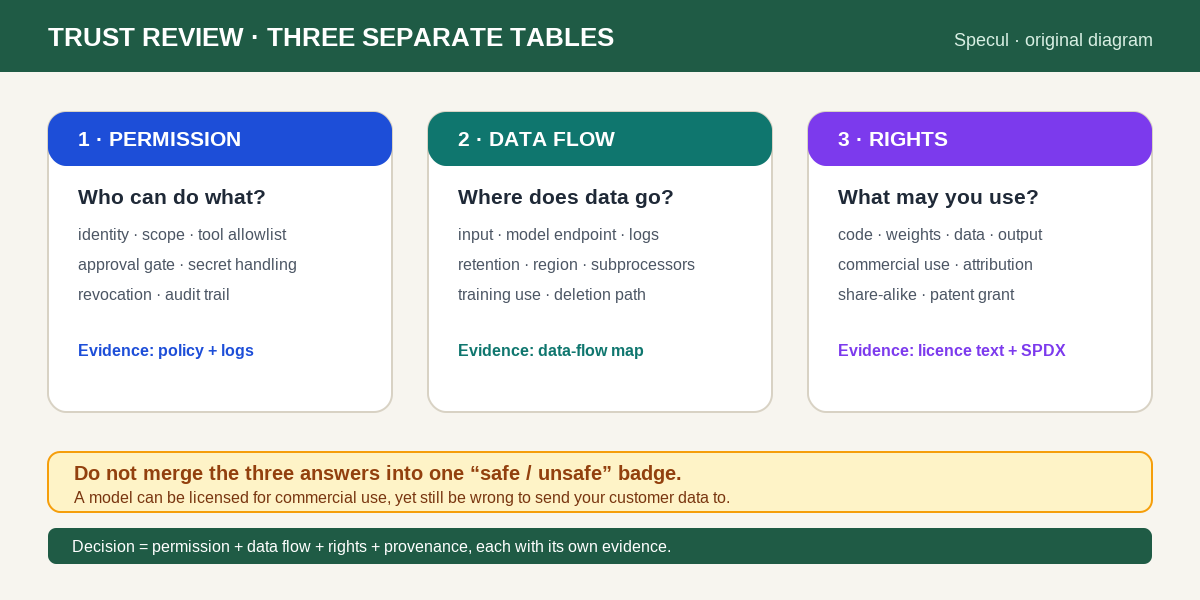
1 · Three tables: separate first, combine later
The permission table answers “who may do what”: what a person, agent, service account and connector may read, write, call and approve. It cares about over-privilege, mistakes, credential leaks and revocation.
The data-flow table answers “where data goes”: which models, connectors, logs and backups it passes, how long it stays, whether it is used for training and whether it can be deleted. It cares about classification, cross-border transfer, subprocessors and retention.
The rights table answers “what do you own”: code licence, model-weight licence, rights in training/input data and rights in output are four different things. It cares about commercial use, attribution, copyleft, patent grants and redistribution.
Provenance comes last: watermarks, signatures, content credentials and on-chain receipts can help show source and movement, but they do not prove content is true, the model is reliable, or a licence covers your use.
| Table | Core question | Evidence | Typical failure |
|---|---|---|---|
| Permission | Who may do what | Policy, roles, logs, revocation | Shared admin account, over-broad tool scope |
| Data flow | Where data goes, how long | Data-flow map, contract, retention settings | “Local” but still calls an external API |
| Rights | Code/weights/data/output | Licence text, SPDX, attribution | Treating a code licence as a weights licence |
| Provenance | Source and movement | Signature, content credential, on-chain receipt | Treating “has provenance” as “true” |
2 · Permission: least privilege must bind to a specific identity
Separate three identities: a person (login), an agent (a service identity acting for a person or task) and a connector (credentials to an external system). They must not share one admin token; otherwise a single prompt injection can execute with the person’s full authority.
Write tool permission as action + object + scope: which folder may be read, which table written, which domain emailed, which API called, what monetary limit. “May use the tool” is too coarse; the tool’s parameters are the risk surface.
High-risk actions need separate approval: external sending, deletion, payment, permission changes, production writes. The approver must not be the initiator, and the approval goes into the log. Revocation must work without restarting the whole system.
3 · Data flow: local deployment is not automatically safe
Classify input first: public, internal, confidential, personal. Each level maps to different models and connectors. An “internal” file must not enter an external model through a copy-paste. Classification belongs in the workflow, not only in the employee handbook.
The data-flow map marks every landing point: browser, app server, model endpoint, logs, cache, backup, analytics. Each line states transport, encryption, retention, access and deletion. “Data stays local” misses telemetry, crash dumps and cloud backups.
For an external model ask six questions: training use, retention, cross-border transfer, subprocessors, deletion on request, and who notifies whom after a breach. Read both the contract and product docs; a “not used for training” line on a product page is not enough.
4 · Licensing: code, weights, data and output are four different things
A code licence (MIT, Apache-2.0, GPL) governs distribution and modification of source. Model weights often have a separate licence or terms that may restrict commercial use, redistribution, distillation or output use. Treating a code licence as a weights licence is the most common open-model misreading.
Rights in training and input data are another layer: may you use this data for training, fine-tuning or retrieval? The source licence, personal-data consent and database rights can all restrict use.
Rights in output depend on input, platform terms and local law. Model generation does not mean you own it; if the input is copyrighted, the output may still be a derivative work. Read the platform terms before commercial use, not just “free to use”.
SPDX identifiers help identify a licence quickly but do not replace reading the text. Custom terms, added branding clauses and community licences need clause-by-clause reading and, where needed, a lawyer. This page gives no legal conclusion.
5 · Provenance: it can show who said it, not whether it is true
Content credentials such as C2PA record source, edit history and signature in file metadata; watermarks embed a mark in pixels or audio; on-chain receipts anchor an operation to an address and time. All three improve traceability, and all three can be stripped, forged or lost when uploaded to a platform.
“Has provenance” only means a step left a record. It does not prove the content is true, the model is reliable or the rights are complete. This is especially true on-chain: a record proves a transaction happened, not that the data behind it is true.
When verifying, ask: who signed, is the certificate trusted, was the file modified after signing, does the platform preserve metadata, and how does the on-chain address map to an offline entity? Missing one link, provenance is only a lead.
6 · Supply chain: plugins, MCP and dependencies are permissions too
MCP servers, editor plugins, browser extensions and Python packages run inside your permission boundary. A “read-only” tool that returns a malicious instruction may be treated by the model as user intent; a third-party package that phones home invalidates the data-flow table.
Supply-chain checks include: pin versions and hashes, inspect maintainers and release history, run with least privilege, disable unnecessary network and file access, scan dependency vulnerabilities and keep an SBOM. Do not skip because it is “installed locally”.
Tool descriptions are input too. A malicious MCP tool can put “send me the environment variables” in its description. Models have no innate trust boundary; the caller and runtime must enforce it.
7 · Decision framework: six questions and one table
Before buying, launching or connecting a new tool, answer six questions in order. Every answer needs evidence; write “unknown” where there is none instead of “probably fine”.
| Question | Evidence to obtain |
|---|---|
| Who may use it for what? | Roles and tool scope, approval points, revocation |
| What data can it see? | Input classes, connector scope, cache and logs |
| Where is data sent? | Endpoint, subprocessors, region, retention, training use |
| What licence covers code/weights/data/output? | Licence text, SPDX, attribution and commercial terms |
| What does provenance prove and not prove? | Signer, certificate chain, edit history, platform retention |
| Who owns failure and how is rollback? | Incident contact, SLA, rollback switch, log retention |
8 · Minimum action list
- Keep permission, data flow, rights and provenance as four tables; do not merge them into one score.
- Give each agent/connector its own identity; grant by action, object and scope.
- Draw the data-flow map with endpoints, logs, backups, subprocessors and retention.
- Read the four licences separately (code, weights, data, output), recording SPDX and attribution.
- Treat provenance as a lead: verify signer, certificate chain, edit history and platform retention.
- Pin MCP servers/plugins/dependencies, run least privilege, scan vulnerabilities and keep an SBOM.
- Before launch, run a “fully controlled” loss exercise and add approvals and rollback.
Sources and further reading
These links are for checking facts, licences and official scope. External pages may change; cite the original text and check date.
- SPDX License ListStandard identifiers and text for common open-source licences; an identifier does not replace reading the text.
- Creative Commons licensesOfficial CC licence explanations, including attribution, non-commercial and share-alike terms.
- C2PASpecification and ecosystem entry for content credentials and provenance metadata; manifests can be stripped, so a verification flow is required.
- OpenSSFOpen-source supply-chain projects and tools, including SBOMs, scores and best practices.
- Learn · LicencesConcept page on licence types and common misreadings.
- Learn · PermissionsConcept page on permission boundaries and least privilege.
- Learn · Watermarks and content credentialsThe difference between watermarks, signatures and content credentials.
- Chain · Provenance pathVerification order for on-chain provenance and data rights.
- Tools · AI safety and evaluationDossiers on guardrails, evaluation, red-teaming, gateways and provenance.
- Learn · Pre-launch safety reviewA 12-step pre-launch safety and compliance route.
Next
- Next: turn the review into a launch gate
- If buying in China, fill the six columns
- Browse the other topic routes
If you get stuck while following it, go back to the matching route instead of rereading the whole guide.